A conversation for PATCON26 · Portland, October 5–8 Bring your perspective

Introducing the Family Support Dashboard

Less administration.
More time for connection.

You bring the relationship.
Let’s simplify the work around it.

A clearer way to prepare, document, and follow through.
Built around family-centered home visiting and the people who deliver it.

Shaped by home visitors

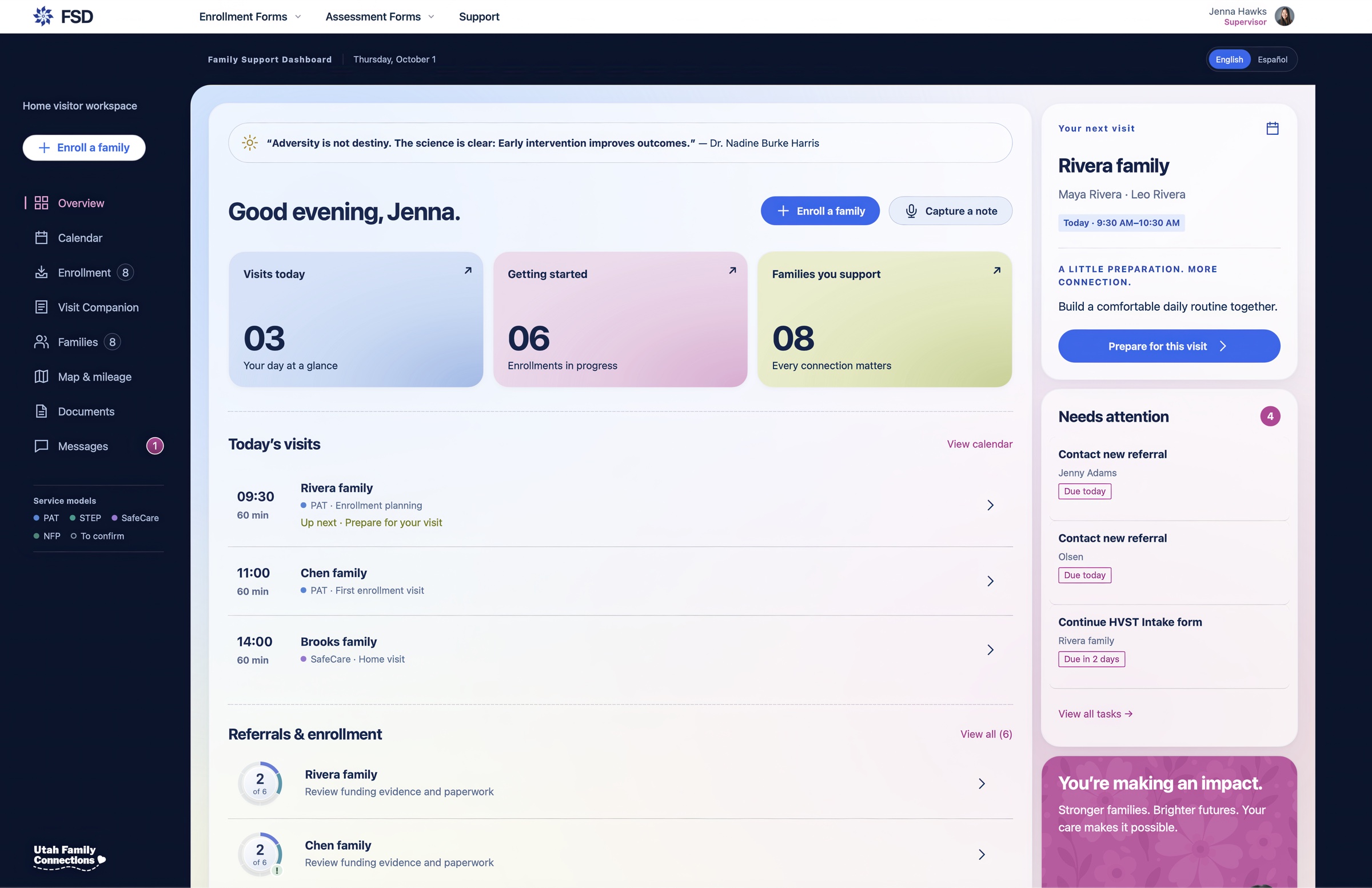
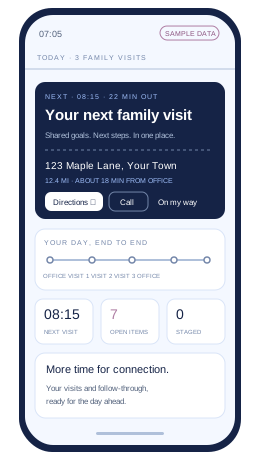
FSD prototype: Jenna’s workspace shows today’s visits, enrollments, families supported, the next visit, and tasks that need attention.
One place to see your day. More room to be present. Prototype preview · Sample dataThe pinwheel icon shown here is part of Prevent Child Abuse Utah’s branding as the official Utah chapter of Prevent Child Abuse America. Your organization’s dashboard will use your own logo and branding.
A collaboration grounded in home visiting
Utah Family
Connections
Prevent Child Abuse UtahMophead Media

The work around the visit

One family.
So many moving parts.

You know the family. You know their goals. But the same information can live across forms, deadlines, and data systems. FSD is being developed to bring that work together.

A clearer next step

Less to keep in your head.
More clarity in your day.

Upcoming tasks, documentation, and required signatures, brought into one workspace. So it’s easier to see what needs your attention next.

✓
Prepare for a personal visitFamily goals · Visit planning
Up next
↗
Follow up on a referralKeep the connection moving
To do
☑
Review required signaturesOne less loose end
Review

Illustrative workflow

Guidance built around your program

Different models.
A shared need for simplicity.

Utah Family Connections offers four home visiting models. FSD is being shaped around their distinct requirements, supporting the work of evidence-based home visiting while respecting each model’s approach.

PATSafeCareSTEPNFP
FSDOne workspace

Less repetition. Better follow-through.

The details belong
together.

Intake and consent forms. Assessments. Planning guides. Reports. A connected workflow designed to help complete the right documentation before it’s due.

A child in a red sweatshirt sitting outdoors in warm evening light.

The reason behind the work

More room to listen.
Connect. Follow through.

Technology should support the relationship at the heart of every home visit.

Built around your organization

Start with a foundation.
Make it yours.

Your organization shouldn’t have to reshape its work to fit one-size-fits-all software. Begin with FSD’s core framework, then shape it around your people, programs, and processes.

For nonprofits, government agencies, and departments, we work with you to define what your organization needs and build from there.

01 / YOUR PROCESSES

Fit the way
your program works.

Explore enrollment steps, model-specific forms, reporting requirements, and approval paths that reflect your team’s responsibilities.

  • Program-specific enrollment checklists
  • Mileage allocation by funding source
  • Review and approval workflows
02 / YOUR PEOPLE

The right view.
For each role.

Shape the workspace around home visitors, supervisors, administrators, and leadership, with access designed around their responsibilities.

  • Role-specific dashboards and permissions
  • Supervisor views and follow-up priorities
  • Terminology your team already uses
03 / YOUR IDENTITY

Your organization.
Recognizably yours.

Bring your branding into the experience and explore connections with the tools your organization depends on.

  • Your logo, colors, and program names
  • Calendar connections, such as Google or Outlook
  • Reporting exports and system integrations

Examples of customization to scope together. FSD is in development; availability, integrations, and permissions will be confirmed for each organization.

A faster path from feedback to improvement

More room to iterate.
More possibilities to explore.

AI-assisted development helps us move from an idea to a working prototype faster and reduce repetitive coding work. Starting with a shared foundation can make customization more accessible and less costly than building every feature from scratch.

Human review, testing, and security validation remain part of the work. We shape each customization around your program’s requirements and the information it needs to protect.

Tell us what your team needs

Customization pricing reflects scope and complexity. Integrations and specialized requirements are scoped together, with the shared foundation helping reduce development effort and cost.

Shaped by real days in the field

More time with families.
Less time entering it twice.

Mileage. Calendars. Paperwork. We’re designing the connections that help home visitors and supervisors spend less of their day catching up.

Planned · ClickTime integration

You made the visit.
Don’t rebuild the trip.

Bring visit mileage and funding details into one review, with a planned connection to ClickTime that aims to reduce repetitive expense entry.

  • Associate each trip with the family’s funding source, using your organization’s allocation rules.
  • Account for training and group events that need split funding.
  • Review mileage, descriptions, and funding before sending an expense record for approval.
A clearer path to reimbursement
Family visitTrip + funding source
Staff reviewCheck the details
Expense handoffClickTime connection planned
Illustrative workflow · Integration feasibility and permissions to be confirmed.
Planned · Calendar sync

Your day, together.
Even between visits.

FSD’s prototype brings visits and document deadlines into month and agenda views. Next, we’re planning connections to the work calendar your team already uses.

  • Explore Google Calendar and Outlook connections to reduce duplicate scheduling.
  • Keep visit preparation, follow-ups, and deadlines in view.
  • Give authorized supervisors a clearer picture of the team’s scheduled day.
A day with room to prepare
9:00 AMPrepare for a family visit
10:00 AMPersonal visit
2:00 PMReflective supervision
Fictional agenda · External sync is planned. Shared event details will follow your privacy and access rules.
Exploring · Documentation

Paper when you need it.
Less retyping afterward.

For teams that prefer paper during a visit, we’re exploring ways to scan approved forms and prepare draft entries for staff review. Keep the family connection at the center and verify the details before they enter a record.

Exploring · Reporting

Know what’s required.
Know what’s ready.

Separate model requirements from funder and evaluation requirements. See what’s missing, ready for review, or entered in a required reporting system, so fewer loose ends reach the deadline.

Exploring · Staff development

Supervisors, make room
for growth.

Bring coaching follow-ups, staff training milestones, and review dates into view. Help new home visitors build confidence and experienced teams keep learning, alongside your program’s supervision practices.

These priorities come from conversations with home visiting teams. FSD is in development. Integrations, form permissions, and availability will be confirmed with each organization; time savings will be evaluated with participating teams.

Around every personal visit

Support for your workflow.
Space for your expertise.

From the first preparation to the last follow-up, the goal is a simpler path through the work that surrounds family connection.

Illustrative scene of a home visitor in a blue polo waving to a mother holding her baby, with a toddler holding her leg at their front door.
01 / PREPARE

Start with the family.
Arrive with a plan.

Bring upcoming visits, family context, and planning guides into view. Know what’s next before you head out, with less time spent finding the pieces.

  • See your schedule and upcoming tasks
  • Review the family’s goals and next steps
  • Prepare the documentation your program needs
Your next personal visit

SAMPLE FAMILY

Rivera family

Maya & Leo

Today · 9:30–10:30 AM
A little preparation. More connection.

Build a comfortable
daily routine together.

✓ Family goals ready to review
✓ Planning guide in one place
Illustrative preview of the planned workflow

The reason behind every visit

More room for
moments like these.

A shared laugh. A new discovery. A little more confidence.
Responsive, back-and-forth interactions help build the foundations for early learning. Simpler workflows should make more room for that connection.

A child on an adult’s shoulders, sharing a playful moment with two adults outdoors.
An adult lifting a smiling baby into the warm afternoon light.
A young child laughing while riding a playground swing.

For supervisors & program leaders

Supervisors, see your whole team.
Know where to step in.

Know who needs support. Identify where you can help.

Your team needs more than another place to enter information. FSD’s supervisor workspace is designed to connect family progress, documentation, staff schedules, and follow-up, so you can turn visibility into support.

Support your peopleStrengthen follow-throughPrepare with confidence

Supervisor workspace concept · Requested capabilities in development

FSD Supervisor workspaceSAMPLE DATA

YOUR PROGRAM, IN VIEW

A clear start to your day.

Illustrative program overview
3Parent educators
36Active families
8Pending enrollment
4On hold

Your team

Select an educator to explore
AMAlex Morgan12 active · 3 pending · 1 on hold2 to review
Family A-104Last visit 34 days agoContact review
Family A-118Assessment received; entry pendingREDCap: not entered

Next supervision: Thursday, 10:00 AM

JTJordan Taylor14 active · 2 pending · 2 on hold2 to review
Family B-207On hold for 82 daysHold review
Family B-215Quarterly documentation checkFile review due

Next supervision: Friday, 11:00 AM

CLCasey Lee10 active · 3 pending · 1 on holdReview planned
Family C-302Documentation reviewedREDCap: entered
Family C-310Assessment still neededMissing assessment

Next supervision: Tuesday, 9:00 AM

Illustrative interface, not a live supervisor dashboard. Names and records are fictional. Timing examples reflect the participating team’s workflow; program rules need to be confirmed.

What changes for leadership

Less time piecing it together.
More time moving it forward.

These are the priorities supervisors brought to the table and the practical difference each could make for their teams.

01 / TEAM CAPACITY

See the caseload.
Understand the context.

Open a home visitor’s profile to see active families, pending enrollments, waitlisted families, and families on hold. Move from the team view into the family file and the work that still needs attention.

For leadership

A clearer starting point for conversations about workload, enrollment, and where additional support is needed.

02 / FAMILY ENGAGEMENT

Notice a gap.
Start a conversation.

Surface families without a recent recorded visit and those approaching a hold review. Give the supervisor and parent educator a shared place to review the context and decide on follow-up.

For leadership

An opportunity to reconnect sooner and make intentional decisions about continued services.

03 / DOCUMENTATION & REPORTING

Know what’s complete.
See what’s still missing.

Bring assessment completion, missing paperwork, and reporting status into view. Distinguish “assessment needed,” “ready for entry,” and “entered in REDCap” without relying on a separate color-coded checklist.

For leadership

A clearer route from completed family work to reviewed documentation and reporting follow-through.

04 / REFLECTIVE SUPERVISION

Protect time for reflection.
Come prepared to support.

Keep upcoming reflective supervision and family file reviews visible alongside the team’s work. Arrive with the relevant context, so the conversation can focus on the educator’s experience and support needs.

For leadership

A more consistent rhythm of staff support and documentation review, with fewer dates to track separately.

05 / CONTINUITY & COVERAGE

Keep the work moving.
Even when someone’s away.

Give authorized supervisors access to review and update family files, add an assessment, or help resolve missing documentation. Account for approved cross-team coverage as well as direct supervision.

For leadership

Less dependence on one person being available, with access scoped to the people responsible for the work.

06 / VISIT COORDINATION

Know the plan.
Be better prepared to help.

See an educator’s scheduled visits, times, and visit locations together. Make the plan easier to find when a supervisor needs to reach or support someone in the field.

For leadership

Better context for staff support during visits. The proposed view shows scheduled locations, not verified live whereabouts.

Built around the way
your program works.

The participating supervisors described twice-monthly reflective supervision, quarterly family file reviews, a prompt after 30 days without a visit, and a 90-day limit on holds. Those examples inform the design; your program’s cadence and requirements would guide implementation.

FSD is being developed to support the work around existing models and reporting systems. Automated REDCap transfer, other integrations, and permission arrangements remain subject to validation.

The case to bring to your leadership team

Make room for better supervision.
Then measure the difference.

The opportunity is bigger than less data entry: a clearer understanding of the program, stronger continuity for families, and more informed support for the people serving them.

Let’s talk about your team

The possibility we’re working toward

What could more
time make possible?

A thoughtful follow-up. More preparation for a family’s goals. Breathing room between visits. Less administration should create room for the work that matters.

ILLUSTRATIVE POTENTIAL

75minutes

less preparation + reporting
per family visit.

A development goal.
A possibility to test together.

Planning and reporting per visit

Current home visitor estimate135–165 min
With FSD · illustrative estimate60–90 min

The 75-minute figure compares the midpoints of these ranges (150 and 75 minutes). These are illustrative estimates from the project concept, not measured results or a guarantee of time saved.

Built with the people doing the work

Your judgment.
At the center.

Utah Family Connections and Mophead Media are developing FSD with a simple priority: make the work around each home visit easier to navigate.

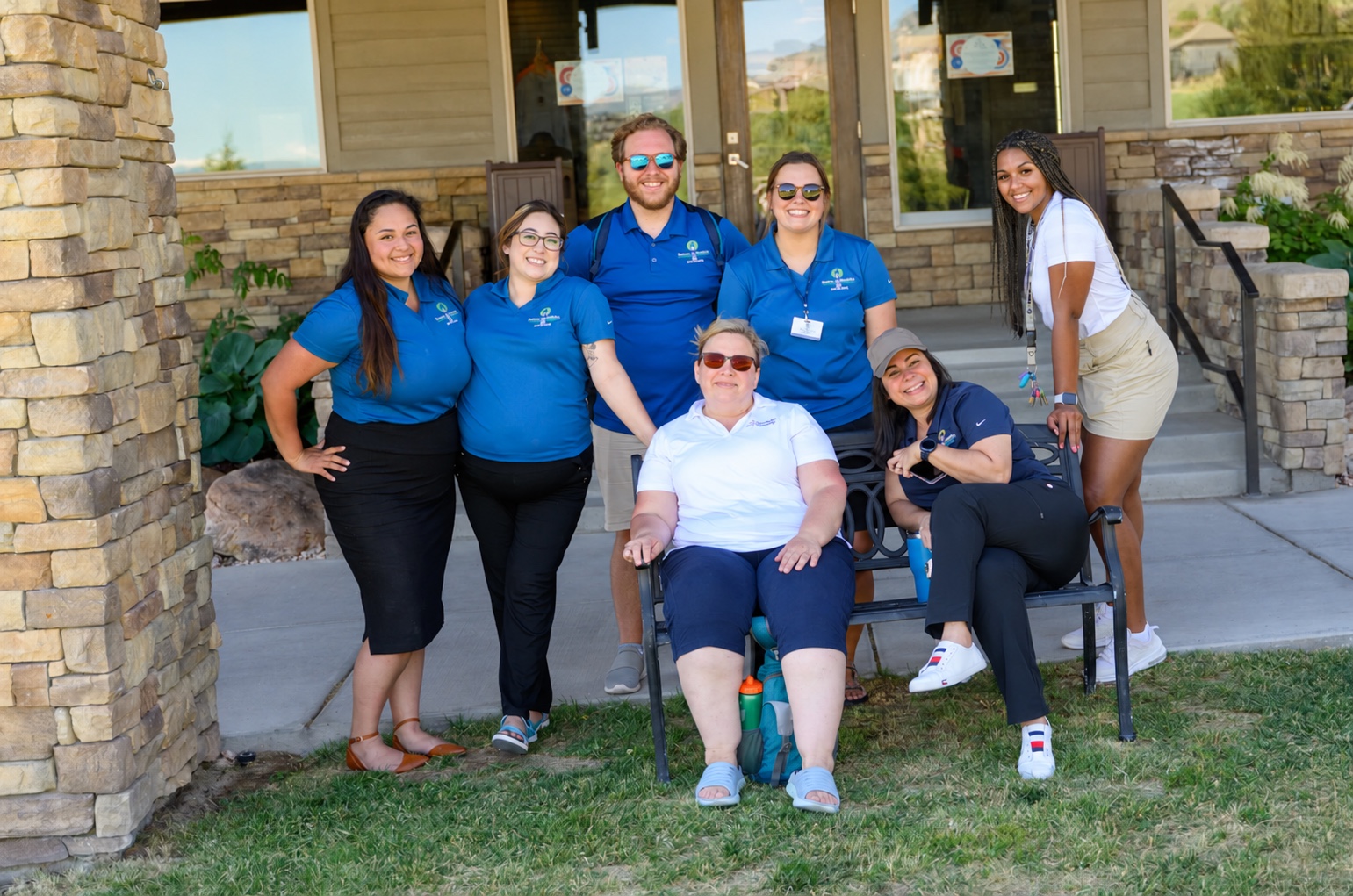
PCAU staff gathered outside, smiling together.
The people behind the work. Prevent Child Abuse Utah
01

Home visitor informed.

Real workflows, repeated data entry, and competing deadlines are shaping the prototype. Your experience can help us decide what matters next.

02

Program aware.

The aim is to support model fidelity: delivering a program as intended. Documentation guidance will be validated with participating teams against model, grant, and state requirements.

03

Human guided.

We’re exploring AI assistance with staff review. Professional judgment and the relationship with each family remain central.

Research that informs our perspective

Strong relationships.
A foundation for development.

Early childhood research helps explain why the relationship matters. Our role is to build thoughtful tools around the professionals who put that knowledge into practice.

01

Responsive relationships.

The back-and-forth exchanges between a child and a caring adult help shape early development. Home visiting makes space to notice and encourage these everyday interactions.

Explore Harvard’s serve and return research ↗
02

Family strengths.

Protective factors include parental resilience, social connections, and practical support in times of need. A family-centered perspective recognizes strengths alongside challenges.

Explore the protective factors framework ↗
03

Support in the face of adversity.

Dr. Nadine Burke Harris’s work brings attention to childhood adversity and toxic stress. Trauma-informed care emphasizes safety, trust, and collaboration, principles that matter when designing how people share information and seek support.

Explore ACEs Aware and Dr. Burke Harris’s work ↗
Understanding ACE scores in context

Adverse Childhood Experiences (ACEs) are potentially traumatic experiences during childhood. An ACE score counts reported categories of adversity, not how often an experience occurred or how severe it was. It does not capture a person’s strengths or protective relationships, provide a diagnosis, or determine their future.

For teams working with ACE screening, scores belong within a broader, trauma-informed assessment by appropriately trained professionals, with attention to consent, privacy, current needs, and available support. Our design perspective keeps the person and family context at the center; FSD does not currently offer ACE scoring or clinical interpretation.

Read more: ACEs Aware screening guidance and the American Academy of Pediatrics on trauma-informed care.

Learn more about Parents as Teachers’ evidence-based home visiting model. These resources inform our perspective; they do not establish FSD’s effectiveness or imply endorsement. FSD remains a prototype to be evaluated with participating teams.

A few things to know

A work in progress.
A shared direction.

Is FSD available today?

FSD launches November 1, 2026. Developed in collaboration between Prevent Child Abuse Utah and Mophead Media, it brings home visiting workflows together in one place. We invite home visiting teams to help shape it ahead of launch.

Is this a Parents as Teachers product?

No. FSD is a PCAU and Mophead Media collaboration. PAT is one of the home visiting models informing the project. This page is an invitation to PATCON attendees, not a statement of endorsement or affiliation with Parents as Teachers National Center.

Will it work with our program’s requirements?

The goal is guidance around model, grant, and state documentation, including enrollment, assessments, planning, signatures, and reporting. Specific requirements, exports, and connections to other systems need to be reviewed with each program.

How are you approaching family information?

Protecting family information is part of the development work. Before any use with real family data, the team will need to review access, consent, data handling, and your program’s security requirements. All previews on this page use sample data.

Have the projected time savings been measured?

Not yet. The preparation and reporting estimates are illustrative. Evaluating the prototype with home visiting teams will help establish what changes in practice.

Start a conversation

Tell us what’s standing between your team and the people you serve.

Whether it’s funding, visibility, or the hours lost to administration, that’s exactly the conversation we want to have.

rich@mopheadmedia.com

Family Support Dashboard · Pricing & early partners

Built for your organization.
Scoped with clarity.

We’re shaping an organization-level subscription model for FSD. Setup, customization, and training are scoped and priced separately. Your demo is a chance to discuss program needs, implementation, ongoing support, and budget—so a proposal can clearly define the subscription, one-time costs, and what’s included.

Now inviting five early partner organizations.

Help shape FSD through practical feedback and conversations about the pricing structure that works for your organization. The program offers introductory pricing, with participation, scope, availability, and pricing terms agreed together before any commitment.

Interested? Choose “FSD early partner program” in the inquiry form and tell us about your team.

What can we help with?

A few details will help us start in the right place.

Please leave out confidential client or family information.

Your inquiry is securely saved and emailed to Rich.

Your workspace at a glance

Expanded FSD sample dashboard, with visits, family counts, next visit, and outstanding tasks.

Sample data

The pinwheel icon shown here is part of Prevent Child Abuse Utah’s branding as the official Utah chapter of Prevent Child Abuse America. Your organization’s dashboard will use your own logo and branding.

Mophead Media